
How to Check What an IP Is Good For (Use-Case Fit)
Once you have an IP, the most practical question isn't "is it good?" but "what is it good for?" The same IP might score perfectly for crawling and score zero for warming a TikTok account.
This article teaches you to work backward from the lookup result to a use case: mapping signals like IP type, risk score, latency, and blocklist status onto the uses you actually care about. The "use-case fit" section on IP You (ipyou.net) gives star ratings directly — this article helps you understand the logic behind them.
The 4 signals that determine use-case fit
- IP type: residential suits "pass as a real person" scenarios (account warming, sign-ups, social media); datacenter suits "bandwidth-hungry" scenarios (scraping, APIs).
- Risk score: the lower it is, the more high-scrutiny uses it can handle; if it's on the high side, it only suits uses that don't care about identity.
- Blocklist: a hit rules out most uses that require reputation.
- Latency / packet loss: real-time scenarios like gaming, streaming, and acceleration are sensitive to network quality — type alone isn't enough.
Scenario 1: TikTok / social account warming (needs a "real-person" feel)
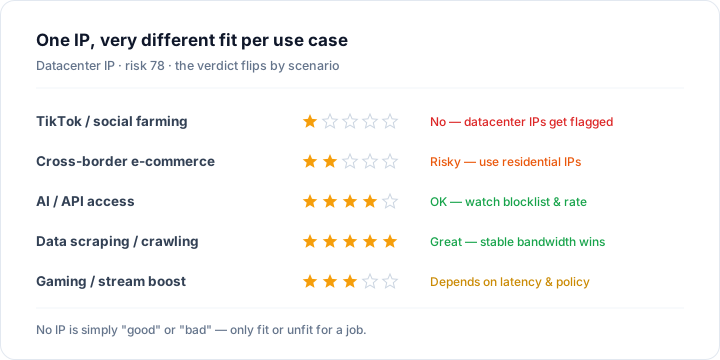
This scenario cares most about "how much you look like a real local user." The ideal IP: home broadband, native, risk score under 40, no blocklist hit, dedicated. A datacenter IP is basically 1 star here — no amount of bandwidth helps, because the platform sees straight through to the datacenter. Example: a Vultr hosting IP used for account warming usually gets throttled right after sign-up.
Scenario 2: cross-border e-commerce, multiple stores (needs "clean and stable")
Multi-store setups fear association and fraud controls most. You need one IP per store, residential and native, with a low risk score. Datacenter IPs are very risky for multi-store (easily flagged as bulk operations). Example: for multiple Amazon / TikTok Shop stores, give each store a dedicated residential IP, and use IP You to confirm the risk score and blocklist status both pass before going live.
Scenario 3: AI / API calls (mostly not picky about residential)
Uses like calling large-model APIs or fetching public data mostly don't care whether you're on a residential IP — a datacenter IP is often more stable and faster. What matters is not hitting a blocklist and not tripping the target service's rate controls. Example: a clean datacenter IP running AI batch jobs is 4–5 stars; but if that IP is blocklisted, the target API may reject it outright.
Scenario 4: data scraping / crawling (needs bandwidth and stability)
Scraping values stable high bandwidth and controllable cost, so datacenter IPs are the natural workhorse — 5 stars. It works as long as the target site doesn't strictly block datacenters. Only if the target site is very sensitive to datacenters (like certain e-commerce / social platforms) do you need to switch to residential proxies.
Scenario 5: gaming / streaming acceleration (needs low latency)
For these scenarios, type isn't the deciding factor — latency and packet loss are. Combine it with IP You's "latency test" to see the measured network quality. Some games / platforms restrict datacenter IPs, so you need both "low latency" and "not datacenter-restricted."
How to check use-case fit with IP You
- Look up the target IP on ipyou.net and first check the three fundamentals: type, risk score, and blocklist.
- Read the "use-case fit" star ratings in the result directly — they've already applied the logic above for you.
- For real-time uses (gaming / streaming), also run the "latency test" to add network-quality data.
- Draw your conclusion against your real use: for high-scrutiny scenarios insist on home broadband + low risk; for bandwidth-heavy scenarios insist on a stable datacenter.
Remember one thing: judging "fit" always means judging against a use. Talking about whether an IP is good or bad without a scenario is meaningless.
FAQ
- How do I know whether an IP is better for account warming or crawling?
- Look at type and risk score. Home broadband + low risk suits account warming / sign-ups; datacenter + stable bandwidth suits crawling / APIs. IP You's "use-case fit" star ratings give you the conclusion directly.
- Is a datacenter IP useless for everything?
- No. It's unsuited to high-scrutiny scenarios like account warming / sign-ups, but it's actually the workhorse for data scraping, AI calls, and running services — provided it isn't blocklisted.
- Does the same IP's use-case fit change over time?
- Yes. A blocklist hit, being identified as a proxy, or a change in ownership all change the conclusion. Re-check before changing what you use it for.
- Does latency matter for use-case fit?
- It matters a lot for real-time scenarios like gaming, streaming, and acceleration, and relatively little for account warming / scraping / APIs. Use IP You's latency-test module to measure it.
Want to check a specific IP? Enter it on thehome pageto see its full details: location, IP type, risk score, blocklist status and more.
Related Topics
- IP Risk Check: What Is a Risk / Fraud Score and How to Read It
- How to Tell a Residential IP from a Datacenter (IDC) IP
- IP Blocklist Check: See Whether an IP Is Blacklisted
- WebRTC Leak Test: Stop Your Real IP From Leaking Behind a Proxy
- What Are ASN and BGP, and How to Look Them Up
- What Is a Native IP (vs a Broadcast IP)?
- Is TikTok Throttling / Banning You an IP Problem? (Troubleshooting Guide)
- How to Change and Optimize Your Home Broadband IP
- What Are CGNAT / Shared IP, and How to Detect Them
- Proxy vs VPN vs Tor: What's the Difference
- How to Check Your Public IP Address (Complete Guide)
- IPv4 vs IPv6: What's the Difference
- The Difference Between Dynamic and Static IPs
- Why IP Geolocation Is Inaccurate, and How Precise It Really Is
- What Is a Dual-ISP Residential IP
- What Is Reverse IP Lookup and How to Use It
- What Is an IP Address
- How Streaming Unblocking Depends on Your IP (Netflix / Disney+ and More)
- What Are whois / RDAP, and How to Read IP Registration Info
- Latency, Packet Loss & TTL Explained
- The Difference Between Dedicated and Shared IPs
- How to Hide Your Real IP and Protect Your Privacy
- How to Check IP Quality: 5 Dimensions to Judge Any IP
- How to Check an IP Risk Score: Scoring Logic and Self-Check
- How to Check IP Purity: A Self-Check Checklist