
How to Check IP Quality: 5 Dimensions to Judge Any IP
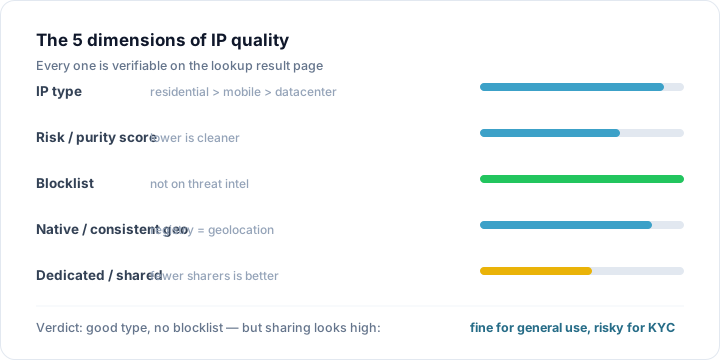
"How good is this IP?" is the question everyone asks before buying a proxy, switching broadband, or warming up an account. But "quality" isn't a vague feeling — it breaks down into 5 objective dimensions you can check off one by one: IP type, risk score / purity, blocklist hits, whether it's native, and whether it's dedicated.
Using the lookup results from IP You (ipyou.net), this article walks you through all 5 in one pass, then uses a few real scenarios to show how the very same result can lead to opposite conclusions depending on what you're using the IP for.
Dimension 1: IP type (the most important)
IP type determines an address's "origin story" in the eyes of a platform, and it's the single biggest factor in quality. The common types are home broadband (residential), mobile networks, datacenter (hosting / IDC), and education / government.
- Home broadband (residential IP): assigned by an ISP to a real household — the closest thing to a "real person," and the highest quality in the vast majority of scenarios.
- Mobile networks: 4G/5G cellular exits — inherently shared and frequently changing, but they carry a strong "real person" signal and suit mobile-first use cases.
- Datacenter / hosting IP: server-hosting addresses, heavily used for scraping and automation, so platforms scrutinize them the most and set the highest risk baseline.
- Education / government: institutional networks — usually clean, but not suited to bulk commercial use.
After a lookup on IP You, the "IP type" label at the top of the result card is exactly this dimension. Seeing "Datacenter" is a red flag; seeing "Home broadband" is a good start.
Dimension 2: risk score / purity
The risk score is a composite 0–100 risk value — the lower, the purer. It compresses signals like proxy / VPN / Tor, abuse history, IP type, and blocklists into one intuitive number. As a rule of thumb: under 20 is extremely pure, 20–40 pure, 40–60 average, and above 60 is questionable.
Dimension 3: blocklist hits
A blocklist entry is a "confirmed bad record" — this IP was observed scanning, brute-forcing, spamming, or taking part in attacks. IP You draws on a large-scale threat-intelligence blocklist; a hit is a strong negative signal that pushes the risk score straight into the high-risk band. Even if every other dimension looks great, a blocklist hit is essentially a veto.
Dimension 4: is it native (consistent ownership)?
Native means the IP's registration matches its actual location and sits close to real users in the target market. If an IP claiming to be "US residential" is registered under some hosting provider, or its location signals conflict across sources, it's likely "disguised" — and its quality takes a hit.
Dimension 5: dedicated or shared
On a shared IP, many people exit through the same address, so someone else's abuse drags you down with it. A dedicated IP is more controllable, but if that dedicated address is itself in a datacenter range or carries a historical stain, its quality is still low.
Scenario: one result, three conclusions
Suppose you look up an IP: type = datacenter, risk score 78, one blocklist hit, Vultr hosting, United States.
- For warming a TikTok / social account: fails. Datacenter + high risk + blocklist means near-certain throttling or bans — swap it out immediately.
- For data scraping / crawling: mostly fine. Stable bandwidth is a datacenter IP's strength, and it works as long as the target site doesn't strictly block datacenters.
- For AI / API calls: it depends. Most APIs don't care whether you're residential, but a blocklist hit may trip their controls — better to pick a datacenter IP that isn't listed.
That's the essence of "IP quality": there's no absolute good or bad, only "good enough for a given use." First read the 5 dimensions to get the objective facts, then draw your conclusion against your actual use case.
Check IP quality in 3 steps with IP You
- Open ipyou.net and enter the IP you want to check (leave it blank to check your current exit IP).
- Go through the 5 dimensions above one by one: type, risk score, blocklist, whether ownership is consistent, and whether the ASN / ISP is a hosting provider.
- Draw your conclusion against your real use case — high-scrutiny scenarios (account warming, sign-ups, KYC) demand strict standards, while scraping / API scenarios can be more lenient.
FAQ
- Which dimension matters most for IP quality?
- IP type and blocklist hits are the most critical. Home broadband with no blocklist hit is the foundation of high quality; a datacenter IP or a blocklist hit essentially rules out "high quality."
- Does a low risk score always mean high quality?
- It's an important part, but not everything. You still need to check whether it's native, dedicated, and whether its location matches your use. A low-risk datacenter IP still fails for account warming.
- Can I check these dimensions for free?
- Yes. IP You can report IP type, risk score, blocklist hits, ASN / ISP, and location from offline data alone — no sign-up required.
- Is it worth checking the quality of my own home broadband IP?
- Yes. After switching broadband or re-dialing for a new IP, a quick check confirms whether the new IP is truly residential and whether it inherited a blocklist stain from the previous user.
Want to check a specific IP? Enter it on thehome pageto see its full details: location, IP type, risk score, blocklist status and more.
Related Topics
- IP Risk Check: What Is a Risk / Fraud Score and How to Read It
- How to Tell a Residential IP from a Datacenter (IDC) IP
- IP Blocklist Check: See Whether an IP Is Blacklisted
- WebRTC Leak Test: Stop Your Real IP From Leaking Behind a Proxy
- What Are ASN and BGP, and How to Look Them Up
- What Is a Native IP (vs a Broadcast IP)?
- Is TikTok Throttling / Banning You an IP Problem? (Troubleshooting Guide)
- How to Change and Optimize Your Home Broadband IP
- What Are CGNAT / Shared IP, and How to Detect Them
- Proxy vs VPN vs Tor: What's the Difference
- How to Check Your Public IP Address (Complete Guide)
- IPv4 vs IPv6: What's the Difference
- The Difference Between Dynamic and Static IPs
- Why IP Geolocation Is Inaccurate, and How Precise It Really Is
- What Is a Dual-ISP Residential IP
- What Is Reverse IP Lookup and How to Use It
- What Is an IP Address
- How Streaming Unblocking Depends on Your IP (Netflix / Disney+ and More)
- What Are whois / RDAP, and How to Read IP Registration Info
- Latency, Packet Loss & TTL Explained
- The Difference Between Dedicated and Shared IPs
- How to Hide Your Real IP and Protect Your Privacy
- How to Check an IP Risk Score: Scoring Logic and Self-Check
- How to Check What an IP Is Good For (Use-Case Fit)
- How to Check IP Purity: A Self-Check Checklist