
How to Check IP Purity: A Self-Check Checklist
"Purity" and "risk score" are often used interchangeably, but they're really two sides of the same coin: purity describes whether an IP "has been dirtied," while the risk score quantifies that purity into a 0–100 number. The higher the purity, the lower the risk score.
This article breaks purity into a checklist you can tick off one item at a time, walking you through each with IP You (ipyou.net). The core conclusion first: purity is a "wooden barrel" — fail any single item and the whole thing is wasted.
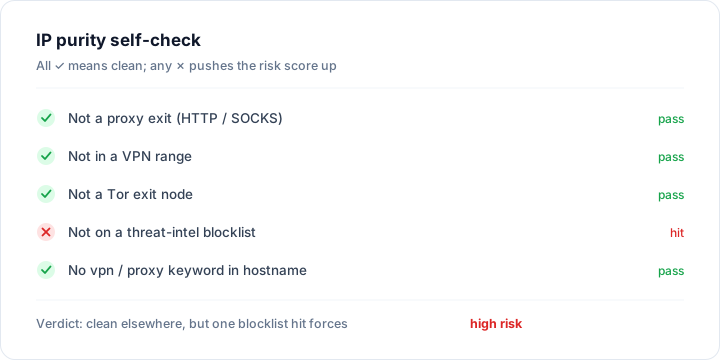
The purity checklist: all must be ✓ to count as clean
- Not a proxy exit (HTTP / SOCKS): shared proxies are the number-one killer of purity.
- Not a VPN range: nearly every commercial VPN IP range is flagged by the platforms.
- Not a Tor exit node: Tor exits are publicly listed, giving them the lowest purity.
- No threat-intel blocklist hit: a hit means a confirmed abuse record.
- No vpn / proxy / socks keywords in the hostname: the reverse-DNS name will "give away" its identity.
- Consistent ownership, not a datacenter range: a datacenter IP disguised as residential takes a purity hit.
IP You turns the first 5 items into lookup fields: VPN / proxy / Tor hits come from dedicated open-source range databases and public exit lists, the blocklist comes from a large-scale threat-intel database, and the hostname comes from live reverse DNS.
Why the "weakest link" effect is so critical
Purity isn't an average — it takes the weakest link. An IP that passes the first 5 items and hits just 1 blocklist gets its risk score pushed straight into the high-risk band, and the "clean" from the other 5 items is almost entirely wasted. Because to a platform, a single confirmed bad record is enough to make the IP untrustworthy.
Example: the clean-looking "trap IP"
Look up an IP: type = home broadband, not a proxy / VPN / Tor, and a clean hostname — 4 of the first 5 items are ✓. But it hit 1 blocklist. Many people order it as soon as they see "home broadband," then find it repeatedly triggers verification when signing up for accounts. The reason is that 1 blocklist hit — this home broadband address was used by a previous user to do bad things, and the stain hasn't washed off yet.
How purity relates to the risk score
Think of it this way: purity is the "cause," the risk score is the "effect." For every ✗ on the checklist, the risk model adds points or applies a floor accordingly, which ultimately shows up in the risk score. So when checking purity, look at both the item-by-item checklist results and the final risk score — the former tells you "where it's dirty," the latter tells you "how dirty."
What to do when purity is low
- Blocklist hit: for home broadband, re-dial for a new IP; for a proxy / cloud host, switch to an address that isn't listed.
- Flagged as proxy / VPN: switch to a native residential line — don't use a shared commercial VPN exit.
- It's a datacenter range: for high-scrutiny uses, always switch to home broadband / premium residential.
- Always re-check after switching: confirm the whole checklist turns ✓ and the risk score has dropped before putting it to use.
Check purity with IP You
- Open ipyou.net and look up the target IP.
- Match the result's proxy / VPN / Tor flags, blocklist hits, IP type, and hostname against the checklist, ticking off each item.
- For any ✗, weigh it against the risk score to decide whether to switch — especially a blocklist hit, which almost always means switching.
- After switching IPs, return to step 1 and re-check until the whole checklist is green.
FAQ
- Are purity and the risk score the same thing?
- They're two sides of the same coin. Purity is a qualitative, item-by-item checklist (has it been dirtied); the risk score is that purity quantified into a 0–100 number. The higher the purity, the lower the risk score.
- Why can a home broadband IP be impure too?
- The most common cause is a blocklist hit — this dynamic address was used by a previous user to do bad things, and the stain is still in the database. Re-dialing for a new one usually makes it clean again.
- What actually counts as a "clean IP"?
- The whole checklist is ✓: not a proxy / VPN / Tor, no blocklist hit, no suspicious hostname keywords, and not a datacenter in disguise. The corresponding risk score is usually under 40.
- Can I test purity for free?
- Yes. Using offline open-source data, IP You can report the key purity fields — proxy / VPN / Tor hits, blocklist, IP type, reverse DNS, and more — with no sign-up required.
Want to check a specific IP? Enter it on thehome pageto see its full details: location, IP type, risk score, blocklist status and more.
Related Topics
- IP Risk Check: What Is a Risk / Fraud Score and How to Read It
- How to Tell a Residential IP from a Datacenter (IDC) IP
- IP Blocklist Check: See Whether an IP Is Blacklisted
- WebRTC Leak Test: Stop Your Real IP From Leaking Behind a Proxy
- What Are ASN and BGP, and How to Look Them Up
- What Is a Native IP (vs a Broadcast IP)?
- Is TikTok Throttling / Banning You an IP Problem? (Troubleshooting Guide)
- How to Change and Optimize Your Home Broadband IP
- What Are CGNAT / Shared IP, and How to Detect Them
- Proxy vs VPN vs Tor: What's the Difference
- How to Check Your Public IP Address (Complete Guide)
- IPv4 vs IPv6: What's the Difference
- The Difference Between Dynamic and Static IPs
- Why IP Geolocation Is Inaccurate, and How Precise It Really Is
- What Is a Dual-ISP Residential IP
- What Is Reverse IP Lookup and How to Use It
- What Is an IP Address
- How Streaming Unblocking Depends on Your IP (Netflix / Disney+ and More)
- What Are whois / RDAP, and How to Read IP Registration Info
- Latency, Packet Loss & TTL Explained
- The Difference Between Dedicated and Shared IPs
- How to Hide Your Real IP and Protect Your Privacy
- How to Check IP Quality: 5 Dimensions to Judge Any IP
- How to Check an IP Risk Score: Scoring Logic and Self-Check
- How to Check What an IP Is Good For (Use-Case Fit)