
How to Check an IP Risk Score: Scoring Logic and Self-Check
An IP risk score (also called a risk value) uses a single 0–100 number to answer one question: when a platform sees this IP, how likely is it to treat it as a "suspicious source"? The lower the number, the safer.
Many people only see the final number without knowing how to read it. Using IP You (ipyou.net), this article explains what the score means and how to act on it, so you don't just "check" the score — you understand it.
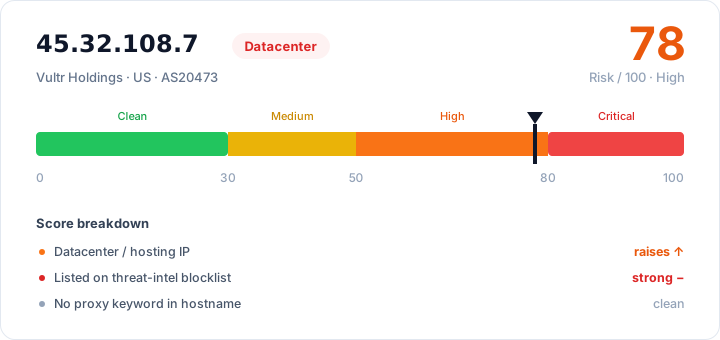
The score combines several signals: a proxy / VPN / Tor exit, a blocklist hit, or an abuse record all push it up, while a clean home-broadband origin keeps it down. A "floor" mechanism ensures that an IP hitting VPN / proxy / blocklist signals won't be scored as "clean" just because its type looks low-risk (for instance, disguised as home broadband).
What counts as safe
- 0–29 low risk: pure — safe for high-scrutiny scenarios.
- 30–49 medium risk: average — fine for ordinary use, but watch out for account warming / sign-ups.
- 50–79 high risk: questionable — usually datacenter / proxy / VPN, not recommended for high-scrutiny scenarios.
- 80–100 critical risk: dangerous — typically Tor / known abuser / multiple blocklist hits, essentially a veto.
How to self-check a risk score with IP You
- Open ipyou.net and enter an IP, or just check your current exit.
- Look at the "risk score" number and its band (low / medium / high / critical).
- Expand the "scoring rationale" and read, line by line, which signals pushed the score up — far more useful than staring at the number alone.
- If it's high, act on the rationale: swap the IP for a blocklist hit, switch to residential if it's datacenter, or turn off the VPN / switch to a native line if it's VPN.
FAQ
- What risk score counts as safe?
- The lower the better. Under 40 suits most scenarios; for TikTok, social media, sign-ups, and other identity-heavy work, pick a home broadband IP under 40. Be cautious above 50, and basically avoid anything above 80.
- Why isn't my home broadband IP's risk score low either?
- Common causes are a blocklist hit (dirtied by a previous user), a suspicious keyword in the hostname, or being identified as a shared exit. Expand the "scoring rationale" to see exactly which one it is.
- Is the risk score still accurate without a third-party risk API?
- IP You produces a meaningful score even in pure offline mode — it combines local signals like IP type, blocklists, VPN / proxy / Tor range databases, and hostname, which is enough for a reference judgment.
- Does the risk score change over time?
- Yes. Blocklists update daily, and an IP's ownership and use change too, so the same IP can score differently at different times. Re-check after swapping IPs or after some time has passed.
Want to check a specific IP? Enter it on thehome pageto see its full details: location, IP type, risk score, blocklist status and more.
Related Topics
- IP Risk Check: What Is a Risk / Fraud Score and How to Read It
- How to Tell a Residential IP from a Datacenter (IDC) IP
- IP Blocklist Check: See Whether an IP Is Blacklisted
- WebRTC Leak Test: Stop Your Real IP From Leaking Behind a Proxy
- What Are ASN and BGP, and How to Look Them Up
- What Is a Native IP (vs a Broadcast IP)?
- Is TikTok Throttling / Banning You an IP Problem? (Troubleshooting Guide)
- How to Change and Optimize Your Home Broadband IP
- What Are CGNAT / Shared IP, and How to Detect Them
- Proxy vs VPN vs Tor: What's the Difference
- How to Check Your Public IP Address (Complete Guide)
- IPv4 vs IPv6: What's the Difference
- The Difference Between Dynamic and Static IPs
- Why IP Geolocation Is Inaccurate, and How Precise It Really Is
- What Is a Dual-ISP Residential IP
- What Is Reverse IP Lookup and How to Use It
- What Is an IP Address
- How Streaming Unblocking Depends on Your IP (Netflix / Disney+ and More)
- What Are whois / RDAP, and How to Read IP Registration Info
- Latency, Packet Loss & TTL Explained
- The Difference Between Dedicated and Shared IPs
- How to Hide Your Real IP and Protect Your Privacy
- How to Check IP Quality: 5 Dimensions to Judge Any IP
- How to Check What an IP Is Good For (Use-Case Fit)
- How to Check IP Purity: A Self-Check Checklist